Linux® is an open source operating system (OS). An operating system is the software that directly manages a system’s hardware and resources, like CPU, memory, and storage. The OS sits between applications and hardware and makes the connections between all of your software and the physical resources that do the work.
| Tool | Description |
|---|---|
| Libreboot | Freedoms boot fimeware |
| Lutris | Play all your games on Linux |
| Bling | Utilities for AwesomeWM |
- See also Terminal for terminal emulators and TUI file managers.
Distribution
A Linux distribution is an operating system made from a software collection that includes the Linux kernel and often a package management system
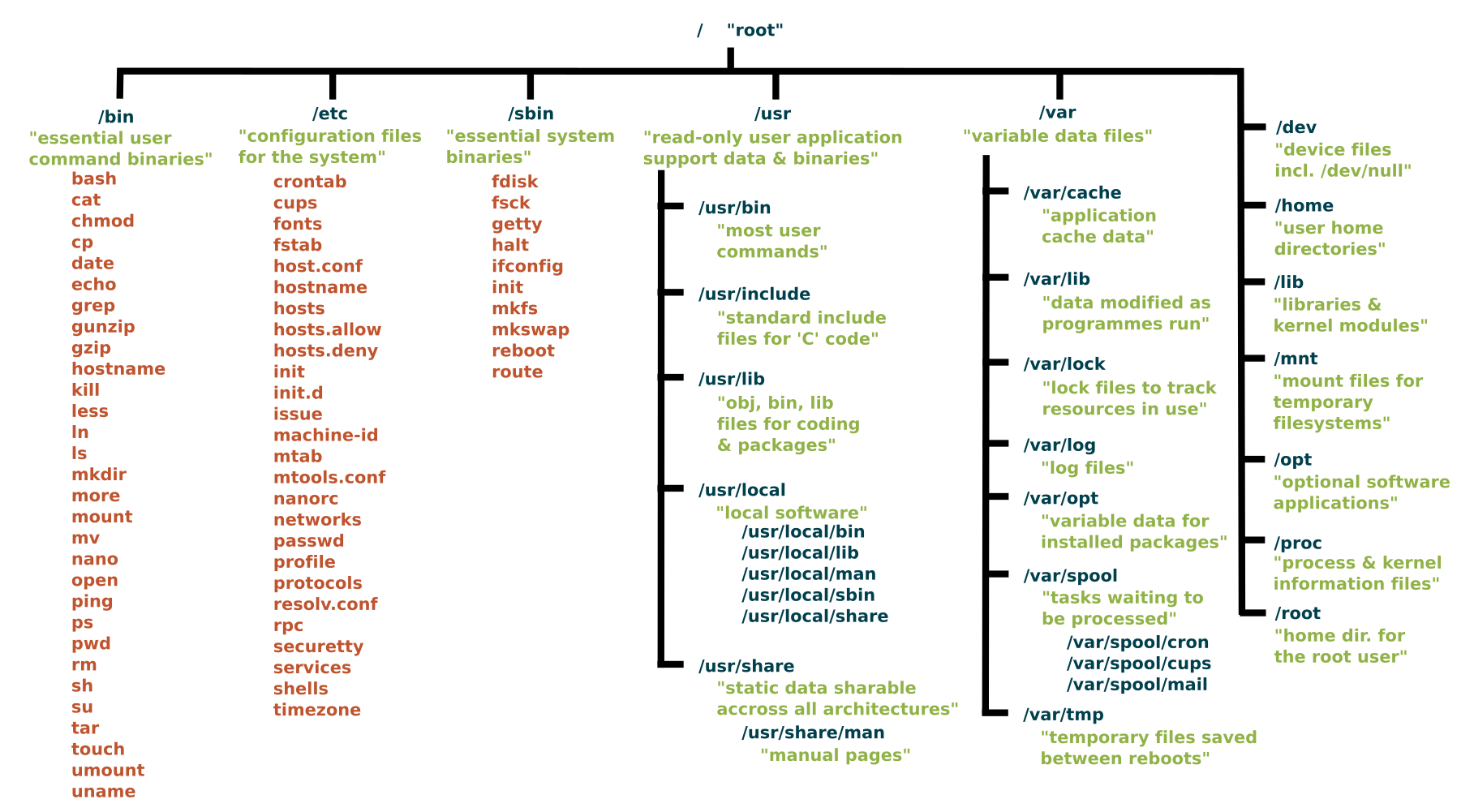
File System Tree
That is the root directory covered, but many of the subdirectories lead to their own set of files and subdirectories. Wikipedia has a break down with a summary of what each directory is used for.
Commands
Users
# change to su user
su -

# create user
sudo useradd -m user_name
sudo passwd user_name

# add user to a group (example with docker)
usermod -aG docker user_name

# create user with custom UID and /home folder
useradd -u 1000 -g 1 -m -d /home/idmuser -c "Usuario IDMuser" -s /usr/bin/sh idmuser

# last users access to machine
last | head -n 10
System info
# display system information
cat /etc/*release

uname -m && cat /etc/*release

cat /etc/os-release
Kernel
lsb_release -aPath
# add /usr/local/bin
export PATH=$PATH:/usr/local/bin
Process
# display currect active processes
ps -fea
ps fax
ps aux

ps -e -o pid,args | grep dvc | grep -v grep | awk '{print $1}'

# without ps
for prc in /proc/*/cmdline; { (printf "$prc "; cat -A "$prc") | sed 's/\^@/ /g;s|/proc/||;s|/cmdline||'; echo; }

# proc file
pid=1825
ls -1 /proc/$pid/fd/*
awk '!/\[/&&$6{_[$6]++}END{for(i in _)print i}' /proc/$pid/maps
ls -l /proc/*/fd
CPU
(Threads x Cores) x Physical CPU = Number vCPU
less /proc/cpuinfo
lscpu
Memory
cat /proc/meminfo
free -mht
vmstat -saS M- Free ram memory
free -h && sudo sysctl -w vm.drop_caches=3 && sudo sync && echo 3 | sudo tee /proc/sys/vm/drop_caches && free -hSwap
# see swapfile status
service dphys-swapfile status

# deactivate swap
sudo swapoff -a

# activate swap
sudo swapon -a

# service
systemctl disable dphys-swapfile
systemctl stop dphys-swapfile
systemctl start dphys-swapfile- Change swap size
# edit file
sudo vim /etc/dphys-swapfile

# change this value
CONF_SWAPSIZE=100

# Restart sevice
/etc/init.d/dphys-swapfile restart
Disk
# display disk use by fodler
sudo du -h --max-depth=1 | sort -hr | more
du -h -d 1 . | sort -hr

# other ways
du -s * | sort -nk 1 | awk '{print $2}' | xargs du -hs
du -hsx * | sort -hr | head -10

df -h /home
du -bsh /home
du -h
du -sh ./*/ | sort -hr
Partitions
lsblk
sudo fdisk -l
sfdisk -ls /dev/sda
sudo parted -l- Resize partitions
# list all partitions
sudo fdisk -l
# tool for resize
sudo cfdisk /dev/sda
Services
# See all services running
sudo service --status-all
sudo systemctl --type=service
sudo systemctl --type=service --state=running
# Stop|Start|Status services
sudo service <NAME> status|stop|start
sudo systemctl status|stop|start|enable|disable|is-enabled <NAME>
# show options service
sudo systemctl cat <NAME>
# List unit files (see also if a service is enabled)
sudo systemctl list-unit-files
sudo systemctl list-units --type service
sudo systemctl list-units --state failed
sudo systemctl list-units --state failed --type service
GPU
# list GPU devices
lspci -k | grep -EA3 'VGA|3D|Display'
lspci | grep NVIDIA

# use watrch for see nvidia-smi per x seconds
watch -n0.1 nvidia-smi
nvidia-smi -l 2

# no devices cuda o multiple devices
export CUDA_VISIBLE_DEVICES=""
Top
- 1 - muestra los cores
- c - mostrar path absoluto
- E - cambiar a MB/GB (arriba)
- e - cambiar a MB/GB (en la tabla)
- k - kill programa con PID XXXX
- h - help
- H - threads/tasks
- I - show the overall percentage of available CPUs in use (if not top show the accumulate over all the CPUs)
Network
Curl
# simple curl
curl http://example:5000/ -o /dev/null -s -w '%{http_code}\n'

# resolve
curl --resolve example.com:443:192.168.211.23 https://example.com -k
Tcpdump
sudo tcpdump -n dst port 443
sudo tcpdump -nni any port 443

# only for 443
sudo tcpdump port 443 and '(tcp-syn|tcp-ack)!=0'
sudo tcpdump -ni any host IP and port 443

# output to pcap file for see in Wireshark
sudo tcpdump -ni any host IP and port 443 -s0 -w test.pcap
Nmap
# scan open ports
namp 17.17.20.160
namp -p- --open -sS -n -Pn 17.17.20.160
# send request to htat machines
namp -sn 17.17.20.160
namp -sn 17.17.20.160-180
# useful information about certs
namp --script ssl-cert -p 443 17.17.20.160
Netstat
# default
netstat -plnt
netstat -nr
netstat -ai
netstat -ant
netstat -pnltu
netstat -pluton
netstat putona
Iperf
# stablish a server in port
iperf3 -s -p 8080
# send request with a client for test speed
iperf3 -c 17.17.20.160 -p 8080
Lsof
# show ports in use
lsof -i -P -n
sudo lsof -iTCP -sTCP:LISTEN -P
lsof -p process-id
IP
# show ips
ip r
# show IP and mask
ip addr
ip -4 -o address

# add rule for single IP to route for 19.16.0.1
ip route add 17.17.20.160/32 via 19.16.0.1
# delete rule
ip route del 17.17.20.160/32 via 19.16.0.1
# print routes
ip route
# show ip path
ip route get 17.17.20.160
SS
ss -tapn
ss -dst :https
ss -dst :5432
Socat
# redirect traffic from localhost to 192.168.49.2
sudo socat TCP4-LISTEN:80,bind=127.0.0.1,fork,reuseaddr TCP4:192.168.49.2:80
DNS
# IP of the nameserver
/etc/resolv.conf

# see DNS redirection
nslookup URL
Firewall
# show tables
iptables -L INPUT -n -v
iptables -L OUTPUT -n -v
# Firewall CentOS
systemctl status|stop|start firewalld
firewall-cmd --state
# Show all the information
firewall-cmd --list-all
firewall-cmd --list-ports
firewall-cmd --list-all-zones
firewall-cmd --get-active-zones
firewall-cmd --get-default-zone
firewall-cmd --check-config
# show trafic
firewall-cmd --get-default-zone
firewall-cmd --get-active-zones
# Remove port
firewall-cmd --zone=public --remove-port=10050/tcp
# Add port to firewall
firewall-cmd --permanent --add-port=5000/tcp
firewall-cmd --reload
# Add port for RDP
firewall-cmd --permanent --zone=public --add-port=3389/tcp
# SAVE ALWAYS THE CHANGES
firewall-cmd --runtime-to-permanent
firewall-cmd --reload
# Debian
ufw allow 5000
Netcat
nc -v 168.91.10.X
sudo nc -l -p 5050
# listen port 443
nc -nlvp 443
Socket
Others
# change terminal
export TERM=xterm

# Test conectivity
curl -v telnet://$IP:$PORT

# See traffic route
traceroute 10.210.7.9

# Test internet connection
curl -I https://www.google.com

# RDP
port 3389

# docker network
ifconfig docker0 |    'inet addr:' | cut -d: -f2 | awk '{ print $1}'
Not (curl/netools/dig)
# netcat
nc -zv ip port
# tcp
timeout 5 bash -c '</dev/tcp/ip/port && echo PORT_OPEN' || echo PORT_CLOSED
Extract IP
# extract IP
curl -s https://httpbin.org/ip
Curl for HTTP2
curl -ks https://name:443/ -X POST -H 'grpc-accept-encoding: identity' -H 'te: trailers' --data-raw $'{"service":""}' -H 'Content-Type: application/grpc+json' -H 'Accept: application/grpc+json' --output - --resolve <name>:443:<IP> -vvv --http2-prior-knowledge --noproxy "*"Simulate network delay
# add delay
tc qdisc add dev eth0 root netem delay 100ms

# remove delay
tc qdisc del dev eth0 root netem delay 100ms
Review connectivity if curl is not installed
# open always in bash
bash
# change <service> for the name
time timeout 4 bash -c 'cat < /dev/null > /dev/tcp/<service>/5000' && echo "OK!" || echo "Result: $? (124 -> timeout; 0 -> Ok)"
Understand /proc/net/tcp
# for all nets
cat /proc/net/tcp
# for specific net in port 8080
cat /proc/net/tcp | grep '00000000:1F90 00000000:0000'
## convert HEX -> Decimal --> 1F90 -> 8080
# healtheck
cat /proc/net/tcp | grep '00000000:1F90 00000000:0000' || exit 1
SSH
-
Steps for
.sshfolder.sshdirectory:700 (drwx------)- public key (
.pubfile):644 (-rw-r--r--) - private key (
id_rsa):600 (-rw-------)
mkdir ~/.ssh && chmod 700 ~/.ssh
touch ~/.ssh/authorized_keys && chmod 600 ~/.ssh/authorized_keys
cat ~/.ssh/id_rsa.pub >> ~/.ssh/authorized_keys
# copy you plubic key inside authorized_keys
ssh-copy-id -i ~/.ssh/id_rsa.pub usuario@ipdestino
# generate custom key- Generate custom keys
ssh-keygen -f name- See access machines by IP users
last -a | grep -i still- Show last users connected
last -a- See access machines
grep -i Failed /var/log/secureRsync
# instead of cp for show progress
rsync -avz
Time
# list time
timedatectl
# set time
sudo timedatectl set-time 15:00:00
Find
- Find a word in a multiple files
grep -irl word- Find a file
# find a file
find -name *.sh- Remove all files in directories and subdirectores
find . -name \*.html -type f -deleteNohup
# background process
nohup python your_file.py > example.log 2>&1 &
Java
# show memory usage
jmap -heap 13129