Windows is a desktop Operating Systems developed by Microsoft. For the past three decades, Windows has been the most popular operating system for personal computers.
Programs
| Programs | Description |
|---|---|
| OpenRGB | Open source RGB lighting control that doesn’t depend on manufacturer software |
| NVcleanstall | Install NVIDIA Drivers |
| Debloater | Remove all unnecesary windows applications |
| Autohotkey | Hotkey software |
| HotkeyD | Hotkey software |
| Trakt-scrobbler | Scrobbler for trakt.tv |
| VIA | Keyboard mapping |
| Vial | Keyboard mapping |
| QMK Fimeware | Keyboard fimewares |
| PowerToys | System utilities |
| O&O ShutUp | AntySpy |
| SumatraPDF | PDF Viewer |
| CoreTemp | Monitor CPU |
| OpenHardware | Monitor tempoerature sensors |
| PowerUP | Information about GPU |
| Handbraker | Video transcoder |
| ShareX | Screen capture |
| DevToys | An offline app that helps developers in daily tasks |
| ModernFlyouts | Fluent design system for windows |
| Files | Building the best file manager experience for Windows |
| KeepassXC | Open-source password manager |
| FanControl | Highly customizable fan controlling software for Windows| |
| mRemoteNG | Open source, tabbed, multi-protocol, remote connections manager |
| glazewm | GlazeWM is a tiling window manager for Windows inspired by i3wm |
| TranslucentTB | A lightweight utility that makes the Windows taskbar translucent/transparent |
| Zebar | Zebar is a tool for creating customizable and cross-platform taskbars |
| Flow.Launcher | Quick file search & app launcher for Windows with community-made plugins |
| ExplorerPatcher | This project aims to enhance the working environment on Windows |
| Komorebi | A tiling window manager for Windows |
| MagicPods-Windows | Add little magic to your Airpods |
| mac-keyboard-behavior-in-windows | Emulates Mac keyboard shortcuts and modifier key behavior on Windows |
Startup Programs
- Open execute window
Win+R:
# delete all unnecesary
shell:startup
# delete all unnecesary
shell:common startup- Open
regeditand delete all unnecessary:
# For User
Computer\HKEY_CURRENT_USER\SOFTWARE\Microsoft\Windows\CurrentVersion\Run
# For Local Machine
Computer\HKEY_LOCAL_MACHINE\SOFTWARE\Microsoft\Windows\CurrentVersion\Run
Open Task scheduler and DISABLE all unnecessary.
- Disable all Edge.
- Disable all Nvidia reports and updates in background.
OpenRGB
E:\Programs\OpenRGB\OpenRGB.exe --gui --startminimized --server- Configuration folder
C:\Users\<user>\AppData\Roaming\OpenRGBLiquidctl
pip install liquidctl pywin32 psutilliquidctl list
liquidctl initialize all
liquidctl status
- Control Fans (NZXT H500i)
- fan1 - 2 frontal fans
- fan2 - 1 back fan
- fan3 - 1 top fan
liquidctl --match "Smart Device" set fan1 speed 40
liquidctl --match "Smart Device" set fan2 speed 40
liquidctl --match "Smart Device" set fan3 speed 40
FanControl
- FanControl Liquidctl
- Avoid one by one permissions for ddl
Get-ChildItem "C:\Program Files\FanControl\Plugins\" -Recurse -File | ForEach-Object {
    Unblock-File -Path $_.FullName -ErrorAction SilentlyContinue
}- Configuration folder
C:\Program Files\FanControl\ConfigurationsVariables
- System variables for configure program, appdata and user profile.
# Env variables
%PROGRAMFILES%
%APPDATA%
%LocalAppData%
%USERPROFILE%
Folders
User config is in C:\Users\Borja, for example .ssh
- Hosts
C:\Windows\System32\drivers\etc- Tmp
C:\Users\Borja\AppData\Local\Temp- SSH
C:\Users\Borja\.sshCommands
- List which process is listening in a port
Get-Process -Id (Get-NetTCPConnection -LocalPort 6443).OwningProcess- List ports
netstat -abn- Kill process
Stop-Process -Id 30240 -ForceInstall Modules
Install-Module -Name Terminal-Icons -Repository PSGallery
Install-Module -Name PSReadLine -Force
Install-Module -Name PSFzf -Force
Install-Module -Name z -Force
Powershell
Personalize Windows Terminal.
- Install windows terminal.
- Install Powershell from Windows Store.
- Install Nerd Fonts for active Icons in particular Inconsolata from the releases and select
Inconsolata Regular Nerd Font Complete Windows Compatible.ttf.- Be careful with the issue 509.
- Change color scheme to Base 16 Ocean.
- Install Startship for custom prompt.
- Edit Powershell profile with VScode.
code $PROFILE
. $env:USERPROFILE\.config\powershell\profile.ps1- Create
profile.ps1file in .config for custom configuration. - Install Terminal Icons.
- Install PSReadLine.
- Install z Directory Jumper.
- Install fzf y PSfzf.
How to know which version of Powershell
$PSVersionTablePackage manager
A package manager or package-management system is a collection of software tools that automates the process of installing, upgrading, configuring, and removing computer programs for a computer in a consistent manner. A package manager deals with packages, distributions of software and data in archive files.
Key
For show windows key open regedit and see the key:
Computer\HKEY_LOCAL_MACHINE\SOFTWARE\Microsoft\WindowsNT\CurrentVersion\SoftwareProtectionPlatform
Drivers
Uninstall all GPU drivers
WSL
# Link .ssh folder
sudo ln -s /mnt/c/Users/<user>/.ssh ~/.ssh
# Link .kube folder
sudo ln -s /mnt/c/Users/<user>/.kube ~/.kubeNetwork
# Add Port Forwarding
netsh interface portproxy add v4tov4 listenport=$port connectport=$port connectaddress=$remoteaddr
# Add Firewall Rule
netsh advfirewall firewall add rule name=$port dir=in action=allow protocol=TCP localport=$port
# Delete PortForwarding
netsh interface portproxy delete v4tov4 listenport=$port
# Delete Firewall Rule
netsh advfirewall firewall delete rule name=$port
# Show PortForwardings
netsh interface portproxy show v4tov4- Internet slow in terminal and in WSL2 ⇒ https://github.com/microsoft/WSL/issues/4901#issuecomment-1933155508
- Traceroute
tracert 8.8.8.8- Restart
resolv.conf
sudo rm /etc/resolv.conf
sudo bash -c 'echo "nameserver 8.8.8.8" > /etc/resolv.conf'
sudo bash -c 'echo "[network]" > /etc/wsl.conf'
sudo bash -c 'echo "generateResolvConf = false" >> /etc/wsl.conf'
sudo chattr +i /etc/resolv.conf- Test connectivity between windows and WSL
# start server in WSL
python -m http.server --bind 0.0.0.0
# attack in windows
curl localhost:8000- Add Static IP to WSL in Networking Mode = NAT. ⇒ https://stackoverflow.com/questions/69691928/can-i-set-a-static-ip-address-for-wsl-2
Modify in regedit:
Computer\HKEY_LOCAL_MACHINE\SOFTWARE\Microsoft\Windows\CurrentVersion\Lxss\NatNetwork Computer\HKEY_LOCAL_MACHINE\SOFTWARE\Microsoft\Windows\CurrentVersion\Lxss\NatGatewayIpAddress
# Current IP
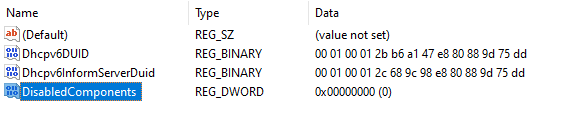
Computer\HKEY_CURRENT_USER\Software\Microsoft\Windows\CurrentVersion\Lxss- Problem IPv6 with WSL ⇒ https://github.com/microsoft/WSL/issues/11002
Errors
- Windows doesn’t respond.
- Open terminal in Admin Mode.
- Enter this commands
taskkill /f /im explorer.exe
start explorer.exe