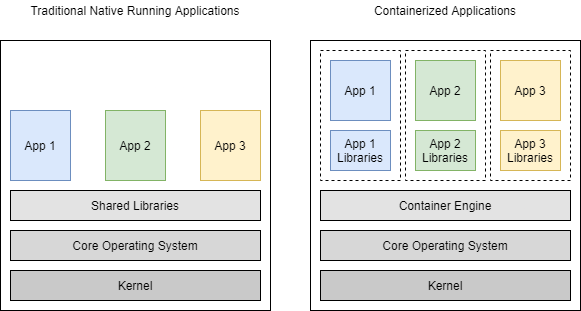
Containers are a form of Operating Systems virtualization. A single container might be used to run anything from a small microservice or software process to a larger application. Inside a container are all the necessary executables, binary code, libraries, and configuration files. Compared to server or machine virtualization approaches, however, containers do not contain operating system images. This makes them more lightweight and portable, with significantly less overhead. In larger application deployments, multiple containers may be deployed as one or more container clusters. Such clusters might be managed by a container orchestrator such as Kubernetes.
Benefits of containers
Containers are a streamlined way to build, test, deploy, and redeploy applications on multiple environments from a developer’s local laptop to an on-premises data center and even the Cloud. Benefits of containers include:
- Less overhead
- Containers require less system resources than traditional or hardware virtual machine environments because they don’t include operating system images.
- Increased portability
- Applications running in containers can be deployed easily to multiple different operating systems and hardware platforms.
- More consistent operation
- DevOps teams know applications in containers will run the same, regardless of where they are deployed.
- Greater efficiency
- Containers allow applications to be more rapidly deployed, patched, or scaled.
- Better application development
- Containers support agile and DevOps efforts to accelerate development, test, and production cycles.
Containers vs. virtual machines (VMs)
People sometimes confuse container technology with virtual machines (VMs) or server virtualization technology. Although there are some basic similarities, containers are very different from VMs.
Virtual machines run in a hypervisor environment where each virtual machine must include its own guest operating system inside it, along with its related binaries, libraries, and application files. This consumes a large amount of system resources and overhead, especially when multiple VMs are running on the same physical server, each with its own guest OS.
In contrast, each container shares the same host OS or system kernel and is much lighter in size, often only megabytes. This often means a container might take just seconds to start (versus the gigabytes and minutes required for a typical VM).
Security
Ensuring the authenticity and integrity of your container images is crucial to prevent security breaches and signing with Open Container Initiative (OCI).
Sigstore tool designed for signing and verifying container images. In a follow-up post, we will take the next step and guide you through the process of validating the signature of OCI images using cosign and tracking the signatures using rekor transparency log.