Amazon Elastic Compute Cloud (Amazon EC2) provides on-demand, scalable computing capacity in the Amazon Web Services (AWS) Cloud. Using Amazon EC2 reduces hardware costs so you can develop and deploy applications faster. You can use Amazon EC2 to launch as many or as few virtual servers as you need, configure security and networking, and manage storage. You can add capacity (scale up) to handle compute-heavy tasks, such as monthly or yearly processes, or spikes in website traffic. When usage decreases, you can reduce capacity (scale down) again.
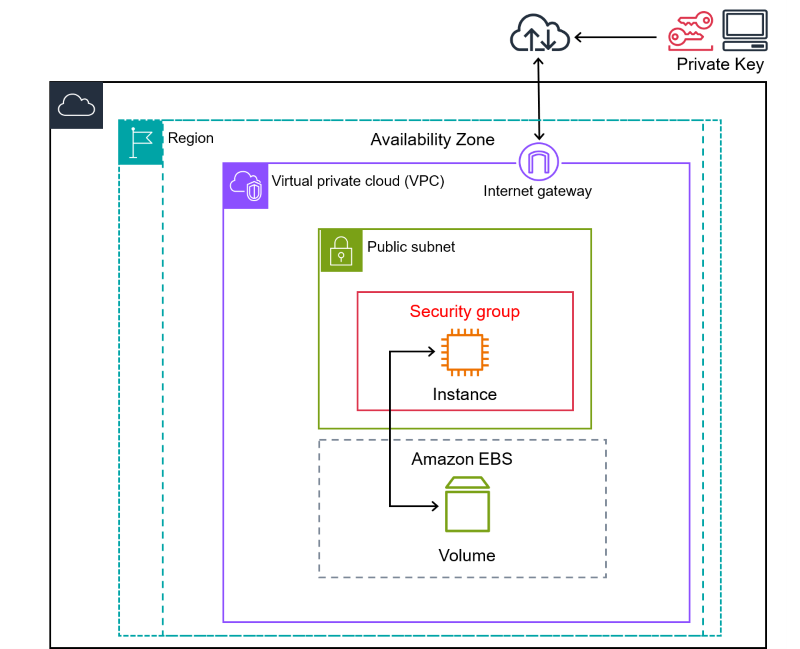
- EC2 Instance Types based on compute resources Details.
- EC2 Instance Types based on prices Prices.
- Pricing comparing instances
- Calculate Data Tansfer for IN/OUT and in different Regions.
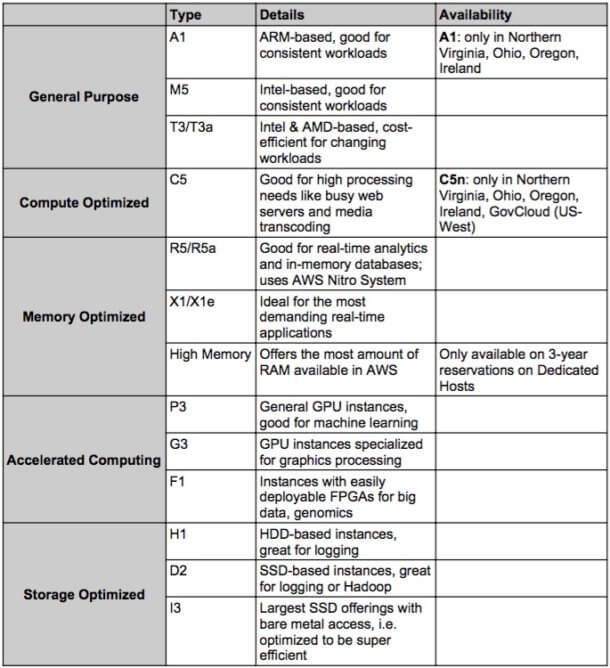
- Roles: roles are preferred from a security perspective. (your can attach a role into a EC2 and use AWS inside with that role)
- Avoid hard-coding your credentials: roles provides access without the use of access and secret key.
- Policies control role’s permissions.
- Your can update a policy attached to a role, and it will take immediate effect.
- Attach and detach roles in EC2 without stopping.
- Metadata in EC2 is data about EC2 itself and you can use bootstrap scripts for access it.
- Only a certain types of instances can be launched in a placement group.
- AWS recommends homogenous instances within cluster placement.
- Your can merge placement groups.
- You can move an existing instance into a placements group.
- For extending your Data Center use AWS Outposts.
# for retrieving metadata
curl http://169.254.169.254/latest/meta-data/
Instances
- On-Demand: pay by the our or the second, depending the type of instance you run. Great for flexibility.
- Reserved: reserved capacity for 1 or 3 years. Up to 72% discount on the hourly charge. Great if you have known, fixed requirements.
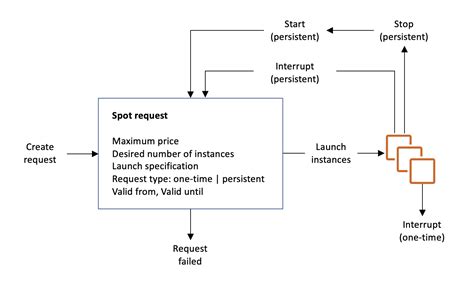
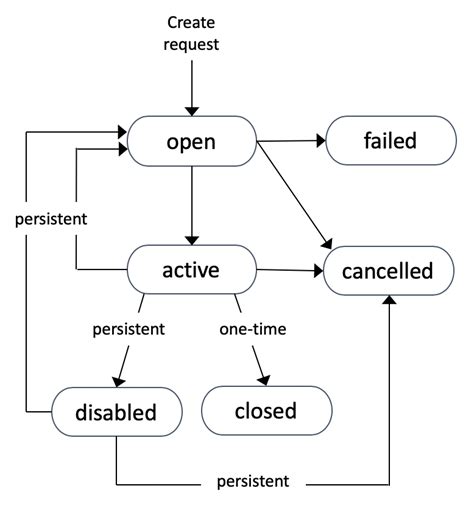
- Spot: purchase unused capacity at a discount of up to 90%. Prices fluctuate with supply and demand. Great for applications with flexible start and end times.
- Dedicated: a physical EC2 server dedicated for your use. Great if you have server-bound licenses to reuse or compliance requirements.
Placement groups
- Cluster Placement Groups: low latency, high network throughput. Cant span in multiple AZs.
- Spread placement Groups: individual critical EC2 instances.
- Partition Placement Groups: multiple EC2 instances (HDFS, HBase or Cassandra)
Security Groups
- Security groups are virtual firewalls for your EC2.
- Any number of EC2 within a security group.
- Multiple security groups attached to a EC2.
- All inbound traffic is blocked by default.
- All outbound traffic is allowed.
- Bootstrap scripts: a script that runs when the instance first run. (it passes user data to the EC2 like commands)
Networking
- Elastic Network Interface (ENI): For basic networking. You can separate by environments like pro or dev and use multiple networks.
- Enhanced Networking (EN): For when you need speeds between 10Gbps and 100Gbps
- Elastic Fabric Adapter (EFA): For when you need to accelerate High Performance Computing (HPC) and ML apps.
Spot instances
-
Use cases:
- Big data and analytics
- Containerized workloads
- CI/CD and testing
- Image and media rendering
- High-performance computing
-
Spot instances save up to 90% of the cost of On-demand instances.
-
You can block spot instances from terminating by using a spot block.
-
Useful for any type of computing where you don’t need persistent storage.
Spot Fleets
A Spot Fleets is a collection of Spot Instances and (optionally) On-Demand Instances. The Spot Fleets attempts to launch a number of Spot instances specified in the Spot Fleet request. The request is fulfilled if there is available capacity and maximum price you specified in the current Spot price.
Strategies:
capacityOptimized: the spot instances come from the pool with optimal capacity for the number of instances launching.lowestPrice: the spot instances come from the pool with the lower price. This is the default strategy.diversified: the spot instances are distributed across all pools.InstancePoolsToUseCount: the spot instances are distributed across the number of spot instance pools you specify. This parameter is valid only when used in combination withlowestPrice.
Savings Plans
EC2 offer clients with regular usage expectations the opportunity to lock in significant discounts off On-Demand pricing in return for commiting to one or three-year terms of use. If you’re able to pay part or all of this cost up front, AWS will tack on an additional discount.
EC2 Instance Savings Plans offer even steeper discounts but are less flexible. First of all, Fargate customers can’t use these plans, and you’re locked into a specific EC2 Instance family and region for the duration of your term. However, these discounts can reach as high as 72 percent, so if you’re sure you’ll use the instances, this is a great option.
Payment Plans
- With up front you pay everithing in up front with saving costs. (The more you pay up front the more you save)
- Partial with payment up front, when you pay parcial each period and up front pay.
- Nothing up front only parcial. (This is little more expensive)
Spot Instances
Spot Instances are another way to purchase computing power at a steep discount. AWS allows customers to purchase unused capacity, but if the capacity is purchased by another user, it will be reclaimed with a two-minute warning. These discounts change slowly based on market demand; currently they are 67 percent for Fargate compute and up to 90 percent for EC2 Instances.
Hibernation
- EC2 hibernation preserves in-memory RAM on EBS
- Mush faster boot up because you don’t need to reload the OS.
- Instance RAM must be less than 150GB
- Instance families include instances in General Purpose, Compute, Memory and Storage.
- Instances can be hibernated for mor than 60 days.
- Available for On-demand and reserved instances.
ECS
ECS Container Optimization
Right Sizing
Container resources are often allocated once, then never reevaluated. Load testing your container applications can help you minimize the amount of resources a container requests, while ensuring that your application can handle its workload.
Auto Scaling
To further optimize container usage, particularly with unpredictable workloads, look into auto scaling the tasks running in your cluster.
ECS Container Consolidation
Consolidate smaller or similar services into a single container. For example, if you have a container to handle internal traffic and a container to handle external traffic, be aware that ECS supports multiple load balancer target groups.
Cost Reduce
- Are all EC2 instances properly sized for their workloads?
- Are they running 24/7? If not, schedule them to shut down overnight and restart in the morning.
- Are any EC2 instances underutilized? Test, Dev, and Pre-prod environments may not need full capacity—scale down where possible.
- Are any instances running only a small function? Consider switching to a serverless approach.
- Can workloads be containerized so they spin up only when needed?
- Can you move workloads from EC2 to serverless? For example, package applications in Docker and run them on Fargate.
- Enable hibernation for instances that don’t need to run 24/7—restoring from hibernation is fast and retains the last state.
- Use Cost Explorer to analyze where the highest EC2 costs come from and leverage other tools for cost predictions.
- Can you commit to specific resources for at least a year? If so, consider purchasing reserved instances.
- For non-critical workloads (e.g., Dev), explore using spot instances to reduce costs.
References
[1]:Docker on AWS