Amazon Web Services is a large web of offerings from Amazon that are centered around the creation, deployment, maintenance, and operations of web applications.
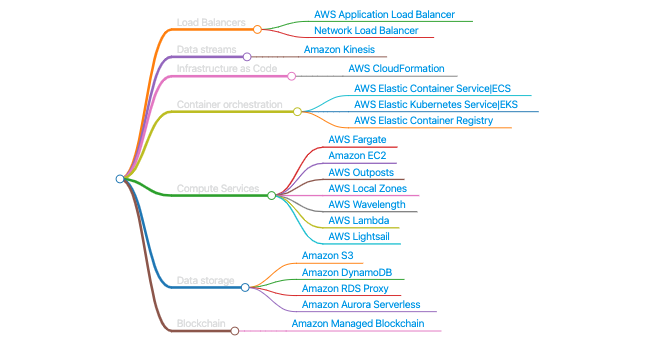
| Tool | Description |
|---|---|
| Localstack | A fully functional local AWS cloud stack |
Compute
Storage
Use cases
- S3: used for serverless object storage
- Glacier: used for archiving objects
- EFS: NFS for Linux instances
- FSx for Lustre: file storage for HPC linux file systems
- FSx for Win: file storage for Windows instances
- EBS Volumes: persistent storage for EC2
- Instance store: Ephemeral storage for EC2
Volumes & Snapshots
- Volumes exist on EBS, whereas snapshots exist on S3.
- Snapshots are point-in-time photographs of volume and are incremental in nature.
- You can share snapshots between AWS accounts as well as regions.
- You can resize EBS volumes on the fly and change types
Encryption
- Data in rest is encrypted inside the volume.
- All the data in flight moving between the instance and the volume is encrypted.
- All snapshots are encrypted.
- All volumes created from a snapshot encrypted are encrypted.
- Create a snapshot of the unencrypted root device volume.
- Create a copy of the snapshot and select the encrypt option.
Instance Store
- Instance store volumes are sometimes ephemeral storage.
- Instance store volumes cannot be stopped.
- EBS-backed instances can be stopped.
- You can reboot both EBS and instance store volumes and not lose data.
- By default root volumes will be deleted on termination.
Backup
- Consolidation: use AWS Backup to back up AWS services, such as EC2, EBS or EFS.
- Organizations: use AWS organizations in conjunction with AWS Backup to back up your different AWS services across multiple AWS accounts.
- Benefits: Backup gives you centralized control, letting you automate your backups and define lifecycle policies your data.
Databases
OLTP: processes data from transactions in real time (e.g., customer orders, banking’s transactions). Data processing and large number of small transactions in real time. OLAP: processes complex queries to analyze historical data (e.g., analyzing net profit figures from the past 3 years and sales forecasting). Data analysis using large amount of data.
- Amazon Document DB is such as MongoDB
- Amazon Keyspaces is such as Cassandra (Serverless)
- Amazon Neptune is for Graph Databases
- Amazon Quantum Ledger DB (QLDB) immutable DB for cryptocurrency.
- Amazon Timestream is for time-series data (Serverless)
Networking
Availability zones and regions
- A Region is a physical location in the world of two or more Availability Zones (AZs)
- An AZs is one or more discrete data centers -each with redundant power, networking, and connectivity - housed in separate facilities
- Edge locations are endpoints for AWS that are used for caching content. Typically, this consists of CloudFront, Amazon’s content delivery network (CDN).
Infrastructure as Code
Container orchestration
CLI
First you need to create and Access Key and a Secret Key. Check more information here.
-
Secret Access Key: only see once. If you lose, you cand delete and create a new one. COnfigure again the CLI.
-
Dont share key pairs: each developer have their own access key ID.
-
Configure aws for specific user
aws configure --profile profile-name- List profiles
aws configure list-profiles- User connected
aws --profile name sts get-caller-identity- List EC2 instances
# EC2
aws --profile name ec2 describe-instances --query "Reservations[].Instances[].[Tags[?Key=='Name'],InstanceId,State.Name]" --output text
aws --profile name ec2 start-instances --instance-ids ID
aws --profile name ec2 stop-instances --instance-ids ID
aws --profile name ec2 describe-instances --query "Reservations[].Instances[].[PublicIpAddress]" --output text- Start RDS
aws --profile name rds stop-db-instance --db-instance-identifier name- Stop RDS
aws --profile name rds start-db-instance --db-instance-identifier nameCore services for Web App
Static Content
Amazon S3 ⇒ For store static content files. Amazon Cloudfront ⇒ Chaching for access the application frontstored in S3
Domain management
Amazon Route 53 ⇒ DNS Services, API Routes, Register domain.
API Hosting
Amazon API Gateway + AWS Lambda ⇒ Register a function and upload Lambda and redirect to GW Aplication Load Balancer + Amazon EC2 ⇒ Deploy inside EC2 a redirecto to LB Aplicacion Load Balancer + Amazon ECS ⇒ Deploy with Docker images
Database
Amazon RDS ⇒ Typicall SQL servers Amazon Redshift (BI) ⇒ Very heavy querys and analytics, for huge data and join columns. Amazon DynamoDB ⇒ NoSQL database (key,value) Amazon ElasticCache ⇒ Redis, Memcache for store database Amazon Neptune ⇒ Graph database
Application Orchestration/Coordination
Amazon SNS ⇒ Connect one service to others with some restrictions or rules Amazon SQS ⇒ Connect one service to others with some restrictions or rules AWS Step Functions ⇒ Workflow processing or sequence
Analytics, Big Data, ML
Amazon Athnena ⇒ Querys over S3 for analytics Amazon Quick Sight → Tableau or PowerBI, build dashboards(BI Tool) Amazon EMR ⇒ Map Reduce jobs Amazon Sagemaker ⇒ Build ML with Notebooks
Security
Amazon VPC ⇒ Build digital Firewall around AWS resources, how to access to our applications, ports AWS IAM ⇒ Configure access for specific resources
Monitoring
Amazon CloudWatch ⇒ Log applications, monitoring, alarms AWS Cloudtrail ⇒ When you have many users and need track them
AWS Certificate Manager (ACM)
EKS
aws eks --region eu-west-1 update-kubeconfig --profile nameCost Reduce
- Awesome Cloud Cost – a curated list of tips for reducing cloud costs.
- Use Reserved Instances (RI) and Savings Plans to lower costs. Consider “smart” automated RI SaaS solutions based on your existing workloads.
- Prefer newer-generation EC2 instances—they are always cheaper. This applies to other products as well, such as using gp3 instead of gp2 for storage.
- Use S3 storage classes to cut costs on less frequently accessed data.
- If using multiple private subnets that require internet access, ensure each has its own NAT gateway. Sharing a single NAT gateway can be more expensive. Alternatively, install a NAT instance on a small EC2 or use only public subnets with strict access controls.
- Move away from Classic Load Balancers (deprecated and more expensive). Use Network Load Balancers (NLB) or Application Load Balancers (ALB) instead.
- Prefer Transit Gateways (or AWS Network Manager) over VPC Peering, especially when dealing with many VPCs, as peering costs scale poorly.
- Use VPC Endpoints to access AWS services internally. However, compare the cost of an endpoint with the cost of direct usage to ensure savings.
- If using S3 Glacier, compress files into as few objects as possible before uploading to reduce request costs.
- A common best practice is to create a centralized “endpoint VPC”, where all endpoints are managed, and the rest of your VPCs/accounts access AWS resources through it.
- Use Cloud-native block storage management for identifying and removing unused or unattached storage volumes.