Amazon Simple Storage Service (Amazon S3) is an object storage service that offers industry-leading scalability, data availability, security, and performance.
Storage Classes
Check out the documentation here.
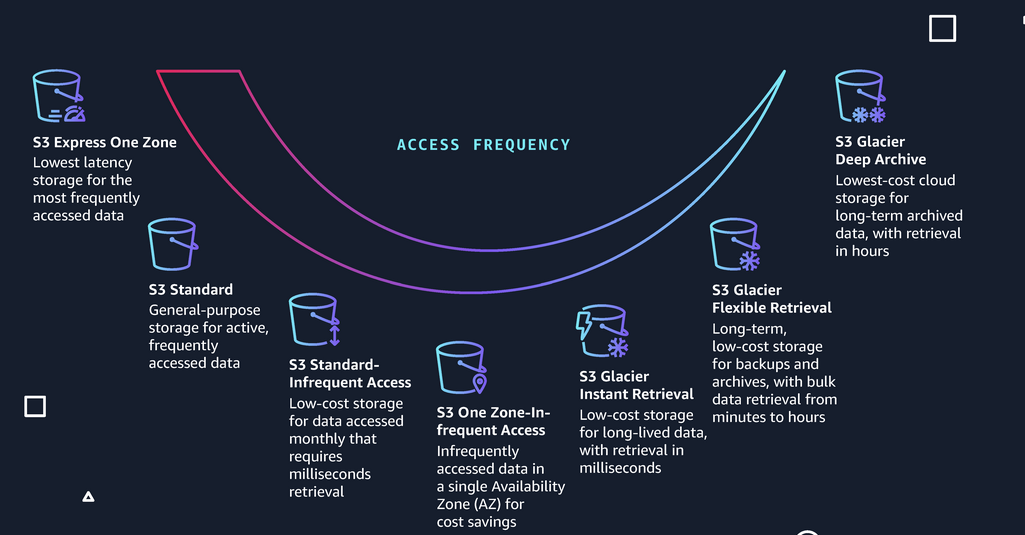
- Storage strategy for setup lifecycle rules :
- Standard - keep for 30 days
- IA - After 30 days
- Glacier - After 90 days
Object Lock
-
Use S3 Object Lock to store objects using a write once, read many model.(WORM)
-
Use WORM in a Vault Lock Policy and lock the policy from future edits.
-
Object lock can be on individual model or applied across the bucket as a whole.
-
Object Lock comes in two modes:
- Governance mode: users cant overwrite or delete an object version or alter its lock settings unless they have special permissions.
- Compliance mode: a protected object version cant be overwritten or deleted by any user, including root user.
-
Legal Hold: prevents an object version from being overwritten or deleted. They look a little like this:
s3:PutObjectLegalHold. -
Glacier Vault Lock: easily deploy and enforce compliance controls for individual S3 Glacier vault with a vault lock policy such as WORM.
Encryption
-
Encryption in Transit with SSL/TLS and HTTPS.
-
Encryption in Rest:
- Server-side encryption
- SSE-S3 (AES 256-bit)
- SSE-KMS
- SSE-C
-
Client-Side encryption, you encrypt the files previously.
-
Enforcing encryption with a Bucket Policy
- Create a policy that Deny all PUT request that don’t include
x-amz-server-side-encryptionin header.
- Create a policy that Deny all PUT request that don’t include
-
Server-side encryption - Legacy workflow: 1 - The
x-amz-server-side-encryptionparameter will be included in the request header. 2 - Two options:x-amz-server-side-encryption: AES256orx-amz-server-side-encryption: aws:kms3 - PUT request header is included and tells S3 to encrypt the object at the time of upload.
Tips
- Files up to 5TB.
- Unlimited storage.
- S3 is a universal namespaces.
- S3 Objects:
- Key: object name
- Value: data itself
- Version ID: for store multiple versions of the same object
- Metadata: data about the data storing
- Object ACLs (Access control list): make individual object public using ACLs.
- Buckets are private by default.
- Buckets policies: can make entire buckets public using bucket policies.
- HTTP status code: upload S3 object to S3 return 200 HTTP status code.
- Static Content: use S3 to host statis content only (not dynamic)
- Automatic Scaling: S3 scales automatically with demand.
- All versions are stored in S3 includes all writes and delete object events.
- Version cannot be disabled only suspended.
- Version support MFA.
- Use Multipart Upload and S3 Byte-Range Fetches (Parallel Downloads) files for better performance.
- Better performance with different prefixes (prefix is like a directory), its important to organize all the data in different prefixes.
- Files over 5GB must be use multipart upload.
- If you encrypt S3 objects with SEE-KMS, KMS limits are affected and will count KMS quota for upload/download and cannot increases that.
- You need to create a Batch Job for replicate existing objects.
- Delete markers are not replicated by default.