PostgreSQL is a powerful, open source object-relational database system that uses and extends the SQL language combined with many features that safely store and scale the most complicated data workloads.
| Tool | Description |
|---|---|
| Timescaledb | A time-series database for high-performance real-time analytics packaged as a Postgres extension |
| PGVector | Open-source vector similarity search (VDB) for PostgreSQL. |
| Repmgr | A lightweight replication manager for PostgreSQL |
| Neon | Neon: Serverless Postgres. We separated storage and compute to offer autoscaling |
| Paradedb | Postgres for Search and Analytics |
| Pgai | A suite of tools to develop RAG, semantic search, and other AI applications more easily with PostgreSQL |
Articles/Talks
- Certificate Authentication Recipe for PostgreSQL Docker Containers
- PostgreSQL High Availability and automatic failover using repmgr
- Pgpool
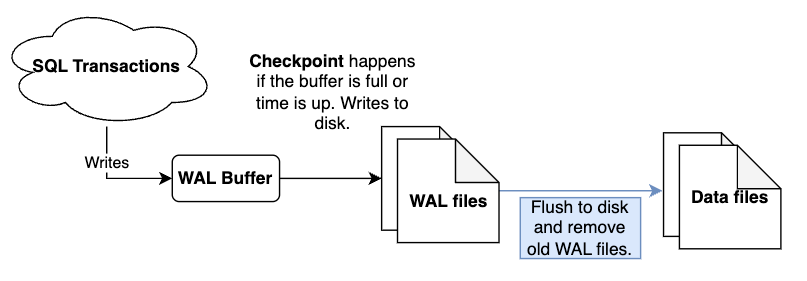
WAL (Write Ahead Log)
WAL logs are the files in which various transactions are stored. These logs are written to disk before the changes are made to the database.
- Data recovery.
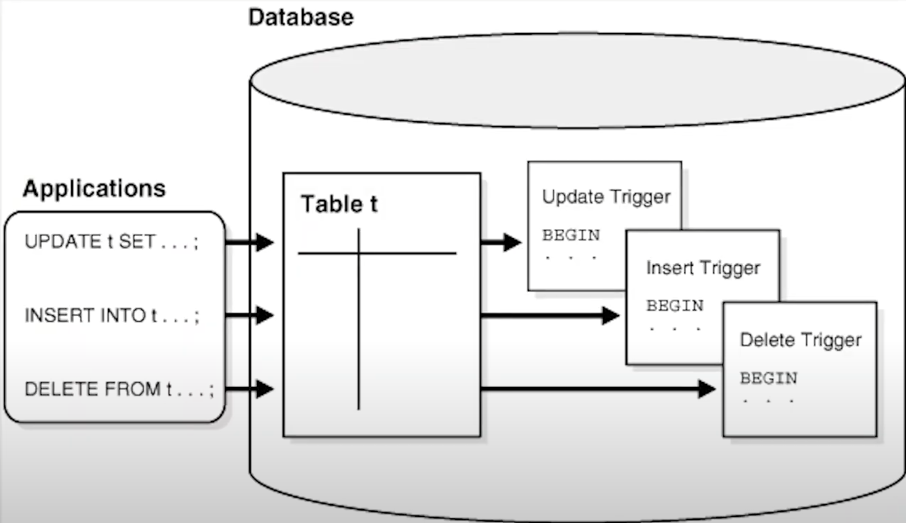
- Triggers for mutations.
Replication
Data logical replication
-
How to Set Up PostgreSQL Logical Replication: Use Cases and Step-by-Step Guide
-
Use pgoutput plugin
-
Use pub/Sub
-
It is similar of how Debezium works
-
You must have to configure one Primary database as a Publisher
-
Configure a Replica Database as a Subscriber
-
How to add for example the table
usersto replicate.
CREATE PUBLICATION central_railway_system_pub
FOR TABLE
  users,
  train_schedules,
  tickets,
  payments,
  seat_reservations
WITH (publish = 'insert, update, delete');- In the subscriber site.
-- Create a subscription to the primary database
CREATE SUBSCRIPTION central_railway_system_sub
   CONNECTION 'host=<primary_ip> port=5432 dbname=primary_db user=replicator_user password=<secure_password> sslmode=require'
   PUBLICATION central_railway_system_pub
   WITH (
      copy_data = true,   -- Copy existing data to replica db.
      create_slot = true,
      enabled = true
    );
Vaccum
VACUUM in PostgreSQL is a maintenance command that reclaims storage space occupied by dead tuples (old row versions that are no longer needed) and updates internal statistics for better query performance. It helps prevent database bloat and ensures efficient use of disk space by marking the space as reusable for new data.
- PostgreSQL databases require periodic maintenance known as vacuuming.
- All tables need to be
VACUUMed (either manually or with autovacuum) at least every 2 billion transactions- If you ever get the error message “database is not accepting commands”, you are dangerously close to transaction ID wraparound. Most PostgreSQL users understand the principle behind transaction ID wraparound, but many PostgreSQL users have a wrong idea of how to fix the problem.
- Each transaction gets a sequential XID, since they’re 32 bit ints, they will eventually wrap around.
- Preventing Transaction ID
Debezium
Since Debezium is using a replication slot on PG, Debezium constantly sends back to PG the information up to which LSN it has consumed so that PG can flush the WAL files. Now, this information is stored in the table pg_replication_slots. When Debezium starts up again, it reads the restart_lsn from that table and requests changes that happened before that value. This is how Debezium is ensuring data integrity. Not that if for some reason, that LSN is not available in the WAL files, there is no way to get it back, meaning data loss has happened.
Triggers
Example data2Json
CREATE OR REPLACE FUNCTION public.my_json_converter(
	application varchar(64),
	category varchar(64),
	customer_reference_id varchar(8),
	exception_reason varchar(128),
	event_timestamp timestamp
)
  RETURNS json
  LANGUAGE PLPGSQL
  AS
$$
declare
	json_payload varchar(300);
BEGIN
	select json_build_object(
	'application', application ,
	'category', category ,
	'customer_reference_id', customer_reference_id ,
	'exception_reason', exception_reason ,
	'event_timestamp', event_timestamp
	) into json_payload;

	RETURN json_payload;
END;
$$- See if the trigger is apply correct
SELECT tgname, tgrelid::regclass, tgfoid::regprocedure
FROM pg_trigger
WHERE NOT tgisinternal;
AWS Lambda
# install
CREATE EXTENSION IF NOT EXISTS aws_lambda CASCADE;- Execute a lambda when
CREATE OR REPLACE FUNCTION public.my_db_trigger_function()
  RETURNS TRIGGER
  LANGUAGE PLPGSQL
  AS
$$
declare
	my_record record;
BEGIN
	raise notice 'Start my_db_trigger_function';
	SELECT * FROM aws_lambda.invoke(aws_commons.create_lambda_function_arn('arn:aws:lambda:eu-west-1: :function:my_rds_triggered_topic_writer')
,(select public.my_json_converter(
								new.application ,
								new.category ,
								new.customer_reference_id ,
								new.exception_reason ,
								new.event_timestamp
	)
)
  , 'Event'
) into my_record;
	raise notice 'End my_db_trigger_function';
	RETURN NEW;
END;
$$
PSQL
| Command | Description |
|---|---|
\c <database> | Connect to a specific database |
\password <user> | Change password for a specific user |
\l | List all databases |
\d+ | Show detailed information about various database objects |
\dt | List all tables in the current database |
\du | List all users |
\df | List all functions |
\dv | List all views |
\dn | List all schemas |
\dp | List all permissions |
\di | List all indexes |
\ds | List all sequences |
\d+ | Show detailed information about various database objects |
\q | Quit psql |
\x | Toggle expanded output |
- Access DB
	psql -h localhost -U admin -W
psql -d postgres -U webadmin -W
# AWS
psql -U user -h hostname.rds.amazonaws.com -p 5432 database- List all DB
\l
\c database;
\dn- List tables
\dt - Exit
\qBackup and Restore
| Command | Description |
|---|---|
pg_dump <database> > backup.sql | Backup a database to a file |
psql <database> < backup.sql | Restore a database from a file |
SQL
- Delete table in DB
DELETE FROM tablename;- Access DB
REVOKE CONNECT ON DATABASE nova FROM PUBLIC;
GRANT CONNECT ON DATABASE nova TO user;- Access Schema
REVOKE ALL     ON SCHEMA public FROM PUBLIC;
GRANT USAGE ON SCHEMA public TO user;- Access Tables
REVOKE ALL ON ALL TABLES IN SCHEMA public FROM PUBLIC ;
GRANT SELECT   ON ALL TABLES IN SCHEMA public TO read_only ;
GRANT SELECT, INSERT, UPDATE, DELETE ON ALL TABLES IN SCHEMA public TO read_write ;
GRANT ALL ON ALL TABLES IN SCHEMA public TO admin ;- Create
CREATE USER user WITH PASSWORD 'pass';
CREATE DATABASE database;
GRANT ALL PRIVILEGES ON DATABASE database TO user;
GRANT ALL PRIVILEGES ON SCHEMA database TO user;- Delete all connections
SELECT
	pg_terminate_backend(pg_stat_activity.pid)
FROM
	pg_stat_activity
WHERE
	pg_stat_activity.datname = 'database_name'
AND pid <> pg_backend_pid();- Create sample data
CREATE TABLE products (
	product_name char(50),
	price int
)

INSERT INTO products (product_name, price)
VALUES
('Desktop Computer',800),
('Laptop',1200),
('Tablet',200),
('Monitor',350),
('Printer',150)
SELECT * FROM products- List enums
select enum_range(null::my_enum);