SQL (Structured Query Language) is a standardized programming language used for managing and manipulating relational databases. First developed in the 1970s by IBM, SQL has become the most widely used language for querying and managing structured data. It allows users to interact with databases by performing tasks such as retrieving data (through SELECT queries), updating records, inserting new data, and deleting unwanted information.
SQL is fundamental to relational database management systems (RDBMS) like MySQL, PostgreSQL, Microsoft SQL Server, and Oracle Database. Its core strength lies in its ability to handle large datasets with complex relationships while maintaining data integrity. SQL also supports various powerful features like joins, indexing, and transactions, which enable efficient querying, reporting, and data analysis. Whether in enterprise systems, web applications, or data analytics, SQL remains an essential tool for database management and information retrieval.
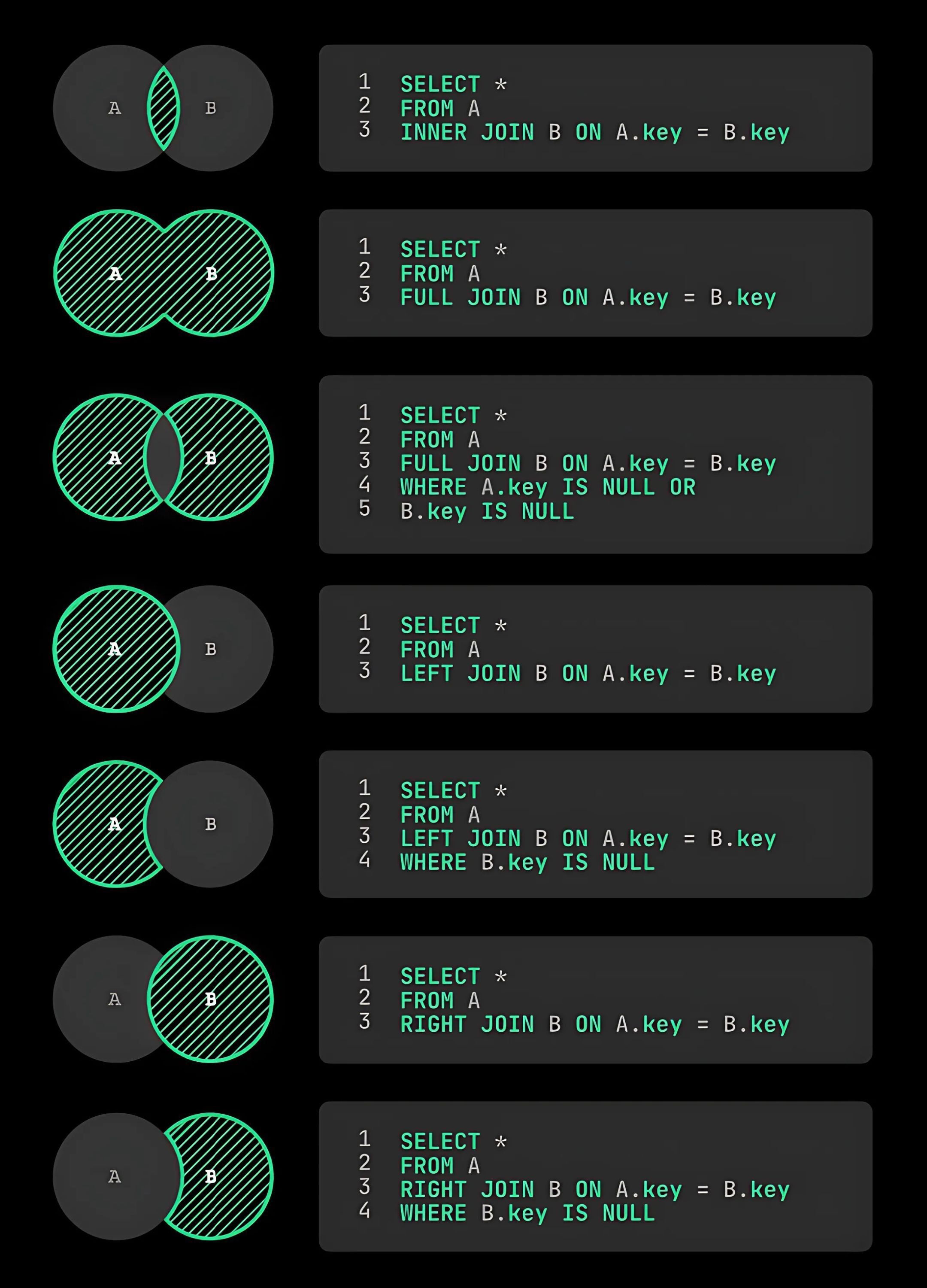
Data Definition Language (DDL)
| Command | Description |
|---|---|
CREATE DATABASE <db> | Create a new database |
DROP DATABASE <db> | Delete a database |
CREATE TABLE <table> (<column_1> <column_1_type>, <column_2> <column_2_type>) | Create a new table |
DROP TABLE <table> | Delete a table |
ALTER TABLE <table> ADD COLUMN <column> <column_type> | Add a new column to a table |
ALTER TABLE <table> DROP COLUMN <column> | Remove a column from a table |
ALTER TABLE <table> RENAME COLUMN <column> TO <new_column> | Rename a column in a table |
ALTER TABLE <table> RENAME TO <new_column> | Rename a table |
TRUNCATE TABLE <table> | Remove all rows from a table |
CREATE INDEX INDEXNAME ON <table> (<column>) | Create an index on a table |
DROP INDEX INDEXNAME | Remove an index from a table |
Data Manipulation Language (DML)
| Command | Description |
|---|---|
INSERT INTO <table> (<column_1>, <column_2>) VALUES (<value_1>, <value_2>) | Insert a new row into a table |
SELECT * FROM <table> | Retrieve all rows from a table |
UPDATE <table> SET <column_1> = <value_1> WHERE <column_2> = <value_2> | Update rows in a table |
DELETE FROM <table> WHERE <column> = <value> | Delete rows from a table |
Data Query Language (DQL)
| Command | Description |
|---|---|
SELECT <column_1>, <column_2> FROM <table> | Retrieve specific columns from a table |
SELECT * FROM <table> WHERE <column> = VALUE | Retrieve rows that match a condition |
SELECT * FROM <table> ORDER BY <column> | Retrieve rows sorted by a column |
SELECT * FROM <table> LIMIT N | Retrieve the first N rows from a table |
SELECT * FROM <table> OFFSET N | Retrieve rows starting from the Nth row |
SELECT * FROM <table> JOIN <table_2> ON <table_1>.<column_1> = <table_2>.<column_2> | Retrieve rows from two tables that match a condition |
SELECT * FROM <table> UNION SELECT * FROM <table_2> | Retrieve rows from two tables without duplicates |
SELECT * FROM <table> GROUP BY <column> | Group rows that have the same value in a column |
SELECT * FROM <table> HAVING COUNT(<column>) > N | Filter grouped rows that have more than N rows |
SELECT * FROM <table> WHERE <column> IN (<value_1>, <value_2>) | Retrieve rows where a column value matches any value in a list |
SELECT * FROM <table> WHERE <column> BETWEEN <value_1> AND <value_2> | Retrieve rows where a column value is within a range |
SELECT * FROM <table> WHERE <column> LIKE '<value>%' | Retrieve rows where a column value matches a pattern |
SELECT * FROM <table> WHERE <column> IS NULL | Retrieve rows where a column value is NULL |
SELECT * FROM <table> WHERE <column> IS NOT NULL | Retrieve rows where a column value is not NULL |
Data Control Language (DCL)
| Command | Description |
|---|---|
GRANT PERMISSIONS ON <table> TO <user> | Grant permissions to a user |
REVOKE PERMISSIONS ON <table> FROM <user> | Revoke permissions from a user |
Transaction Control Language (TCL)
| Command | Description |
|---|---|
BEGIN TRANSACTION | Start a new transaction |
COMMIT | Save changes to the database |
ROLLBACK | Discard changes to the database |
SAVEPOINT <savepoint> | Create a savepoint in a transaction |
ROLLBACK TO SAVEPOINT <savepoint> | Rollback to a savepoint in a transaction |
RELEASE SAVEPOINT <savepoint> | Remove a savepoint in a transaction |
System Commands
| Command | Description |
|---|---|
SHOW DATABASES | List all databases |
SHOW TABLES | List all tables in the current database |
SHOW COLUMNS FROM <table> | List all columns in a table |
SHOW INDEXES FROM <table> | List all indexes in a table |
SHOW CREATE TABLE <table> | Show the SQL statement that creates a table |
DESCRIBE <table> | Show the structure of a table |
EXPLAIN SELECT * FROM <table> | Show the execution plan of a query |
SET autocommit = 0 | Disable autocommit mode |
SET autocommit = 1 | Enable autocommit mode |
SET FOREIGN_KEY_CHECKS = 0 | Disable foreign key checks |
User Commands
| Command | Description |
|---|---|
CREATE <user> '<user>'@'<host>' IDENTIFIED BY '<password>' | Create a new user |
DROP <user> '<user>'@'<host>' | Delete a user |
ALTER <user> '<user>'@'<host>' IDENTIFIED BY '<password>' | Change password for a user |
GRANT ALL PRIVILEGES ON <db> TO '<user>'@'<host>' | Grant all privileges to a user |
REVOKE ALL PRIVILEGES ON <db> FROM '<user>'@'<host>' | Revoke all privileges from a user |
FLUSH PRIVILEGES |
SQL FluFF
[sqlfluff]
verbose = 0
nocolor = False
dialect = snowflake
templater = jinja
exclude_rules = ambiguous.column_count, structure.column_order, structure.subquery, layout.select_targets, layout.spacing, layout.indent, layout.long_lines
ignore_templated_areas = True
ignore = templating
max_line_length = 120
large_file_skip_byte_limit = 0
processes = 0

[sqlfluff:templater:dbt]
project_dir = ./

[sqlfluff:indentation]
indent_unit = space
tab_space_size = 4
indented_joins = False
indented_ctes = False
indented_using_on = True
indented_on_contents = True
indented_then = True
indented_then_contents = True
allow_implicit_indents = False
template_blocks_indent = True

[sqlfluff:rules:references.qualification]
qualification = 'always'

[sqlfluff:rules:aliasing.length]
min_alias_length = 1

[sqlfluff:rules:capitalisation.identifiers]
capitalisation_policy = upper
extended_capitalisation_policy = upper
unquoted_identifiers_policy = all

[sqlfluff:rules:capitalisation.keywords]
capitalisation_policy = upper

[sqlfluff:rules:capitalisation.functions]
extended_capitalisation_policy = upper

[sqlfluff:rules:capitalisation.literals]
capitalisation_policy = upper

[sqlfluff:rules:capitalisation.types]
capitalisation_policy = upper
extended_capitalisation_policy = upper

[sqlfluff:rules:aliasing.table]
force_column_spacing = consistent

[sqlfluff:rules:layout.long_lines]
ignore_comment_lines = true
ignore_comment_clauses = true

[sqlfluff:rules:layout.functions]
force_enable = false

[sqlfluff:rules:layout.cte_bracket]
forbid_subquery_in = both

[sqlfluff:rules:layout.select_modifiers]
single_select_element = multiple_elements

[sqlfluff:rules:layout.commas]
line_position = trailing

[sqlfluff:rules:layout.operators]
line_position = leading>
Querys
SELECT COLUMN_NAME, DATA_TYPE
FROM INFORMATION_SCHEMA.COLUMNS
WHERE TABLE_NAME = 'table_name';
Coalesce
COALESCE is a function in SQL (and many programming languages) that returns the first non-NULL value from a list of expressions.
When your data may contain NULL values, COALESCE helps you replace NULLs with a default value.
COALESCE(value1, value2, value3, ..., default_value)
It evaluates each value from left to right and returns the first one that is not NULL.
SELECT COALESCE(email, 'no-email-provided') AS user_email FROM users;